Corporate Website Redesign Checklist: What IT & Marketing Teams Should Prepare Before Starting
A corporate website redesign should not begin with colour palettes, page layouts, or homepage mockups. It should begin with a systematic review of business objectives, existing content assets, underlying technology, search engine visibility, administrative ownership, project governance, and post-launch maintenance.
For mid-sized and enterprise organisations in Malaysia, a website revamp is rarely just a cosmetic exercise. It is a cross-functional business project that intersects with brand positioning, IT infrastructure, customer data handling, sales enablement, and regulatory compliance.
This planning guide and checklist is designed specifically for:
- IT Managers and Heads of IT who must ensure infrastructure stability, data protection, access control, and integration integrity.
- Marketing Managers and Heads of Marketing responsible for demand generation, customer journeys, brand perception, and organic search visibility.
- Corporate Communications and Digital Teams managing investor relations, brand reputation, media stakeholders, and regulatory disclosures.
- Business Owners and C-Suite Leaders who require clear commercial justification, risk mitigation, and predictable return on investment before signing off on vendor proposals.
What Is a Corporate Website Redesign Checklist?
A corporate website redesign checklist is a structured framework covering the business, content, technical, SEO, security, user experience, and governance requirements that an organisation must evaluate and confirm before commissioning, redesigning, or rebuilding its website.
While a standard consumer website revamp often centres primarily on visual aesthetics and interface trends, an enterprise B2B website revamp involves complex organizational dependencies:
| Corporate Website Redesign | ||
|---|---|---|
| Marketing & Commercial | IT & Architecture | Corporate Governance & Risk Management |
| • Positioning• Lead Gen• SEO Migration• Content Audit | • Hosting / DNS• Integrations• Security/SSL• Performance | • Access Ownership• Vendor Transitions• Compliance & Disclosures• Maintenance SLAs |
Without a structured pre-project review, teams frequently encounter scope creep, unbudgeted integration work, unexpected organic traffic drops, and contentious delays between internal departments.
1. Confirm Why the Website Needs to Be Redesigned
Before writing a Request for Proposal (RFP) or interviewing external agencies, internal teams must define the precise business catalyst driving the project.
What business problem are we trying to solve?
Review your current digital presence against these common triggers:
- [ ] Outdated Corporate Image: The existing visual design no longer reflects the company’s current market standing, operational scale, or maturity.
- [ ] Shift in Corporate Positioning: The business has diversified, acquired subsidiaries, pivoted services, or retired legacy business units.
- [ ] Poor Commercial Enquiries: The site receives web visits but fails to generate qualified B2B leads, RFQs, or procurement contacts.
- [ ] Confusing Information Architecture: Years of incremental additions have left navigation disjointed, making information difficult to locate.
- [ ] CMS Bottlenecks: Marketing must rely on an external developer or overburdened internal IT staff just to publish an announcement or edit text.
- [ ] Inadequate Mobile Usability: The site functions poorly on mobile and tablet devices, frustrating senior decision-makers browsing on smartphones.
- [ ] Vendor Lock-in or Stalled Support: The current web agency provides poor turnaround times, has discontinued support, or retains critical passwords.
- [ ] Obsolete Technology Stack: The underlying CMS, PHP version, or framework is end-of-life, creating severe security vulnerabilities.
- [ ] Declining Search Visibility: The site is losing visibility on Google and fails to surface accurately in modern AI search platforms.
- [ ] Regional Market Expansion: The business is entering new Southeast Asian or global markets requiring multi-region or multi-currency messaging.
Strategic Insight: If your leadership team cannot clearly articulate the commercial problem the website redesign is meant to solve, the project risks becoming an expensive cosmetic exercise with no measurable business impact.
2. Define the Business Outcomes Before Discussing Design
Design without measurable business outcomes produces websites that look attractive in presentations but fail to perform in day-to-day operations. Define your benchmarks before reviewing design agencies.
What should improve after the redesign?
Identify the specific metrics that will determine whether the investment was successful:
- Enhanced Commercial Credibility: Institutional buyers, procurement committees, and strategic partners perceive the organisation as an established industry leader.
- Improved Lead Quality: A measurable increase in inquiries that meet your Ideal Customer Profile (ICP), rather than general spam or job applications sent via sales forms.
- Clarity of Solutions: Prospective clients can immediately evaluate what your company does, who it serves, and your core differentiators within 10 seconds of landing on a page.
- Protecting and Expanding SEO Value: Preserving historical search engine rankings while positioning new priority service lines for organic discovery.
- Operational Efficiency: Reducing the time required for internal teams to draft, approve, and publish company updates, case studies, or annual reports.
- System Reliability: Fast loading speeds across both corporate desktop connections and mobile networks, paired with clean code and minimal technical debt.
Commercial Alignment Matrix
| Current Operational Problem | Targeted Redesign Outcome |
|---|---|
| Outdated corporate positioning | Modern, authoritative digital presence aligned with current enterprise scale and strategic roadmap. |
| Low-quality or vague inquiries | Re-architected conversion journeys with qualifying form fields and distinct commercial pathways. |
| Declining organic search traffic | Comprehensive SEO migration architecture that protects rankings, backlinks, and indexed equity. |
| Rigid, developer-dependent CMS | Intuitive, modular CMS allowing marketing and comms teams to manage day-to-day publishing safely. |
| Vendor dependency & missing files | Full organizational ownership of domains, DNS, source assets, hosting environments, and technical documentation. |
3. Identify the Internal Stakeholders
Corporate website projects involve multiple departments. Projects stall most frequently not because of technical barriers, but because stakeholder roles and approval boundaries were never established at the start.
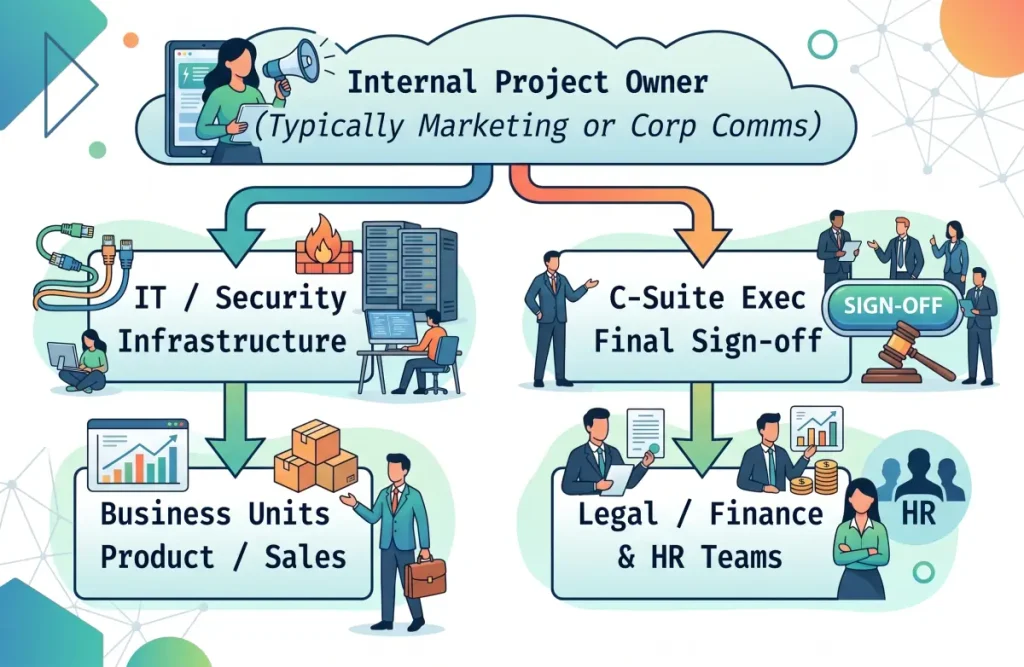
Who owns the website redesign internally?
Assemble a focused internal project committee with clear roles:
- ☐ Project Champion / Day-to-Day Owner: Usually the Marketing Manager, Head of Digital, or Corporate Communications Lead who drives milestones and vendor collaboration.
- ☐ Technical Authority: The IT Manager, Infrastructure Lead, or Chief Technology Officer (CTO) who sets security, hosting, and integration criteria.
- ☐ Commercial Stakeholders: Sales, Business Development, or Product Unit Heads who validate service positioning, customer pain points, and lead qualification requirements.
- ☐ Corporate Governance: Legal, Compliance, or Company Secretarial representatives to review regulatory disclaimers, PDPA policies, and investor disclosure protocols.
- ☐ People & Culture (HR): Talent acquisition leads who provide employer branding materials, culture showcases, and recruitment portal integrations.
- ☐ Executive Sponsor: The Managing Director, CEO, or CFO holding ultimate budget sign-off and project mandate.
Define Decision-Making Responsibilities
Before signing vendor contracts, confirm:
- Who has final sign-off on the information architecture and sitemap?
- Who approves the creative direction and wireframes?
- Who reviews and signs off on corporate copywriting?
- Who reviews and tests the technical infrastructure and data security?
- Who holds final sign-off to authorise the live DNS switch?
- Who manages the single point of communication with the external agency?
Strategic Insight: A redesign committee with too many equal approvers and no designated project owner will experience protracted delays. Designate a single project manager internally with the authority to consolidate feedback and deliver decisive approvals.
4. Audit the Existing Website Before Rebuilding It
Never discard an existing corporate website wholesale. Older enterprise domains often carry years of accumulated authority, indexed search performance, and critical reference documentation that must be catalogued before development begins.
Review What Is Currently Working
Use Google Analytics, Google Search Console, and server logs to identify high-performing assets:
- [ ] Top Organic Landing Pages: Which service pages, articles, or resources bring in the most organic search traffic?
- [ ] High-Converting Touchpoints: Which specific forms or inquiry points currently produce business opportunities?
- [ ] Valuable Inbound Backlinks: Which third-party domains, trade associations, or industry news outlets link to your URLs?
- [ ] Key Brand Documents: Are there product spec sheets, annual reports, product certifications, or white papers that clients frequently download?
- [ ] Active System Integrations: Are there legacy tracking pixels, ERP endpoints, or API webhooks running in the background?
The Content Action Framework
Group every page on your existing sitemap into one of five strategic buckets:
- Keep: High-ranking, high-converting content that merely needs a visual refresh without changing its URL or core messaging.
- Improve: Pages with valuable intent that suffer from poor readability, outdated specifications, or weak calls to action.
- Merge: Multiple short, fragmented blog posts or redundant sub-service pages that cannibalise each other’s search rankings.
- Remove: Obsolete product lines, defunct branch details, past event invitations, or temporary announcements with zero residual traffic.
- Redirect: Every single deleted or renamed URL must be mapped to its closest active equivalent using permanent 301 server redirects.
5. Review Corporate Content and Messaging
A common mistake in corporate website projects is delaying copywriting until visual templates are coded. In reality, layout should follow messaging, not the other way around.
Is the corporate information still accurate?
Audit your corporate narrative across all key sections:
- [ ] Corporate Profile & History: Does the timeline reflect the company’s current operational scale, financial strength, and regional reach?
- [ ] Business Divisions & Subsidiaries: Is the relationship between parent companies, subsidiaries, and product brands articulated clearly?
- [ ] Products and B2B Solutions: Are offerings framed around the client’s operational problems and outcomes, rather than just technical spec lists?
- [ ] Industries & Sectors Served: Can visitors easily identify whether your company has deep experience in their specific industry?
- [ ] Certifications & Accreditations: Are your ISO standards, CIDB ratings, Halal compliance, industry licenses, and safety credentials current?
- [ ] Executive Leadership: Are board members and executive management profiles up to date, complete with professional photography and biographies?
- [ ] Facility Locations & Operational Footprint: Are headquarters, regional branches, manufacturing plants, and warehousing addresses accurate?
- [ ] Investor Relations & Sustainability (ESG): For publicly listed companies or enterprise suppliers, are financial reports, announcements, and ESG commitments accessible?
The First-Time Visitor Test
Evaluate your planned messaging against five foundational questions that any B2B buyer, institutional investor, or auditor asks upon landing on your site:
- Who are you? — Is your corporate identity, group structure, and industry standing immediately clear?
- What do you provide? — Are your core commercial services explained in straightforward business terms?
- Who do you serve? — Does the buyer recognise their own industry, business scale, or technical requirements?
- Why are you credible? — What proof points (accreditations, enterprise clients, track record) validate your capabilities?
- What should they do next? — Is there a clear, frictionless, and appropriate next step for an enterprise buyer?
6. Review Website Ownership and Access
One of the most disruptive operational risks in corporate redesigns is discovering late in the project that the company does not possess administrative ownership of its own digital assets.
Confirm Asset Control Before Appointing Vendors
Ensure all core credentials are held directly in accounts owned by your company’s corporate email addresses, not an individual’s personal email or an external agency’s account:
- Domain Name Registrar: Where is the primary domain (and country-code domains like
.com.my,.my,.asia) registered? Do you have primary administrative login access? - DNS Management: Where are DNS records hosted (e.g., Cloudflare, Route 53, domain registrar)? Do you have permission to edit records and manage TTL values?
- Web Hosting Environment: Where is the site hosted? Do your internal teams have root access, control panel access, or cloud console privileges?
- CMS Super-Administrator Access: Can your team add or revoke administrative privileges within the CMS without vendor assistance?
- Analytics and Search Consoles: Who owns the master accounts for Google Analytics 4 (GA4), Google Search Console, and Google Tag Manager?
- Corporate Communications Channels: Who controls associated accounts such as the Google Business Profile, LinkedIn Page, and YouTube channels?
- Security Certificates (SSL/TLS): Are certificates automated, tied to CDN services, or commercially purchased certificates requiring periodic renewal?
| CRITICAL SECURITY WARNING |
| Never begin a website migration until your internal IT team has verified administrative access to your domain registrar and DNS control panel. If a vendor dispute or operational failure occurs while DNS control is held by a third party, your organisation risks severe email downtime and total loss of digital brand continuity. |
7. Review the Existing Technology and CMS
Evaluating whether your organization needs a visual redesign or an architectural rebuild is a foundational technical decision.
Key CMS Health Indicators
- Support Lifecycle: Is the underlying CMS, PHP version, or database engine actively receiving official security updates?
- Publishing Autonomy: Can internal teams edit text, publish articles, and update product details without requesting developer assistance?
- Codebase & Plugin Bloat: Has the platform accumulated dozens of abandoned third-party plugins or undocumented custom modifications?
- Future Scalability: Can the existing architecture support upcoming business requirements like regional multi-language portals or ERP/CRM integrations?
Redesign vs. Rebuild
| Approach | When to Choose | Expected Impact |
|---|---|---|
| Website Redesign | CMS is secure, modern, and supported; database and URLs are stable. | Focuses on UI/UX, messaging, and conversion journeys. Shorter build timeline with lower technical risk. |
| Website Rebuild | CMS is end-of-life, rigid, compromised, or heavily reliant on legacy hacks. | Structural overhaul of platform, database, and codebase. Eliminates technical debt for the long term. |
8. Protect SEO During the Redesign
The greatest commercial risk in any corporate website revamp is an unmanaged migration that wipes out historical search engine visibility. If search engines encounter broken links and missing content, organic traffic can collapse post-launch.
Audit Existing Organic Search Performance
Before altering site structure or code:
- ☐ Catalogue Top-Performing Pages: Export all indexed pages from Google Search Console, sorting by organic clicks, impressions, and top rankings over the past 12 months.
- ☐ Identify Core Commercial Queries: Document the non-branded search terms (e.g., “industrial warehouse automation contractor Malaysia”) that generate qualified business inquiries.
- ☐ Audit Backlink Profiles: Identify your domain’s most authoritative inbound links to ensure those target URLs are preserved or redirected.
The Technical SEO Migration Checklist
A secure SEO migration must be planned concurrently with the information architecture:
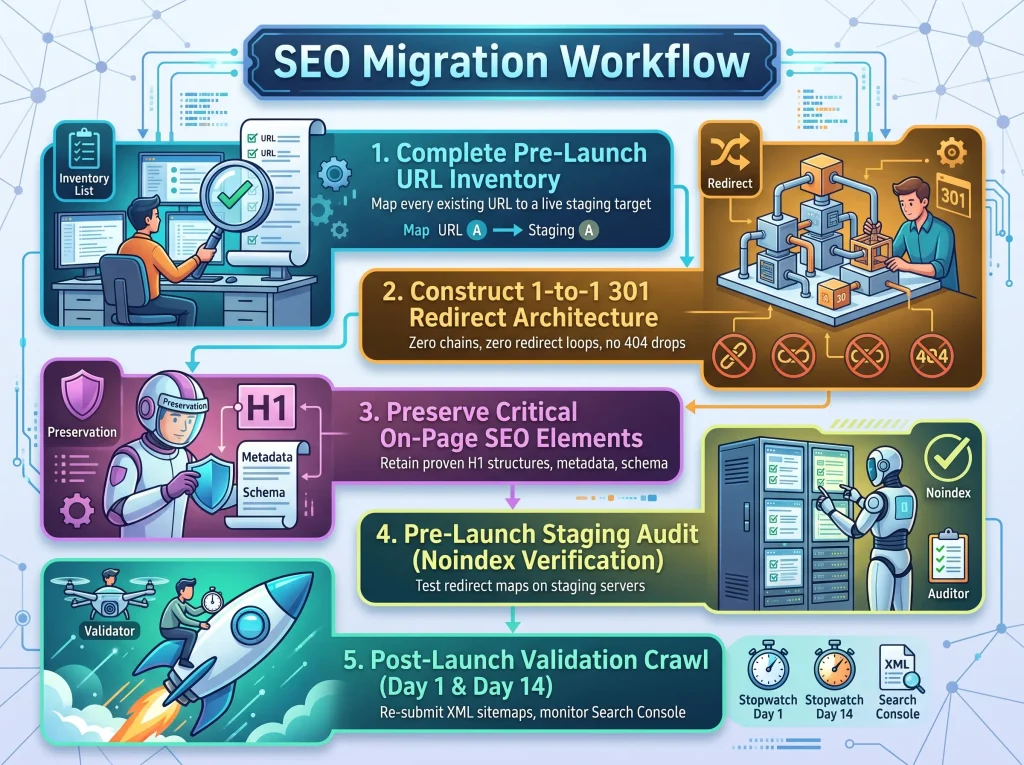
- ☐ URL Structure Preservation: Retain functioning, high-ranking URLs wherever possible. Never change a URL without a strategic justification.
- ☐ Exhaustive 301 Redirect Mapping: Every single old URL that is modified or retired must point to its closest active equivalent. Never redirect all deleted URLs to the homepage, as search engines treat mass redirects as Soft 404s.
- ☐ Metadata Migration: Migrate and refine title tags, meta descriptions, alt attributes, and canonical tags for all commercial pages.
- ☐ Robots.txt & Canonical Tag Review: Verify staging sites are blocked during development and confirm the live
robots.txtconfiguration immediately upon deployment. - ☐ XML Sitemap Submission: Generate an updated XML sitemap and submit it to Google Search Console directly after launch.
Key Rule: An aesthetically superior website that loses its search visibility is a failed commercial investment. Insist on a documented SEO migration plan before any live deployment.
9. Prepare the Website for AI Search
Modern enterprise buyers increasingly use AI-assisted tools (such as Google AI Overviews, Perplexity, and ChatGPT) to research vendors, compare capabilities, and validate reputations.
Can Search and AI Systems Clearly Understand the Company?
To make your corporate information easier for search engines and AI-assisted systems to understand and retrieve:
- ☐ Explicit Corporate Entity Data: State your registered corporate entity name, headquarters, parent relationships, and business model in unambiguous HTML text.
- ☐ Structured Service Taxonomies: Separate individual business lines onto dedicated pages rather than grouping multiple unrelated operations on a single shallow page.
- ☐ Direct Q&A Formatting: Answer common technical and procurement questions using concise, factual language within relevant service sections.
- ☐ Technical Data in HTML, Not Just PDFs: Publish key specifications, capabilities, and accreditations directly in readable HTML tables rather than locking them away in unindexed PDFs.
- ☐ Avoid Text Embedded in Images: Ensure accreditations, service lists, and slogans are written as HTML text or accessible SVGs with alt text, rather than flattened graphics.
- ☐ Implement Schema Markup: Use JSON-LD structured data (
Organization,Corporation,Service,FAQPage,BreadcrumbList) to help automated systems parse your corporate identity accurately.
10. Review UX and Information Architecture
A corporate website serves multiple external audiences, each arriving with distinct goals. The information architecture (IA) must guide these user groups to their intended destination without friction.
Can Important Audiences Find What They Need?
- Procurement Officers & Buyers: Need immediate access to service capabilities, company registration details, product specifications, quality standards, and formal contact options.
- Enterprise Decision-Makers: Seek strategic case studies, client track records, leadership credentials, and overall organizational scale.
- Institutional Investors & Analysts: Require direct access to quarterly financial reports, announcements, board structures, and corporate governance documentation.
- Prospective Talent: Look for company values, work culture, open vacancies, and application mechanisms.
Information Architecture Checklist
- ☐ Predictable Navigation: Keep primary navigation categories industry-standard (e.g., “Services”, “Industries”, “About Us”). Avoid ambiguous, abstract labels.
- ☐ Three-Click Depth Principle: Ensure critical commercial pages and contact points can be reached within two to three clicks from any entry point.
- ☐ Mobile-First UX Hierarchy: Ensure complex tables, navigation menus, and contact actions are fully responsive and easy to tap on handheld screens.
- ☐ Fast Internal Search: Incorporate an accurate search tool with auto-suggestions for websites with extensive documentation, catalogues, or news archives.
- ☐ Contextual Breadcrumbs: Help visitors arriving from deep search engine links immediately understand where they are within your site hierarchy.
11. Review Corporate Trust Signals
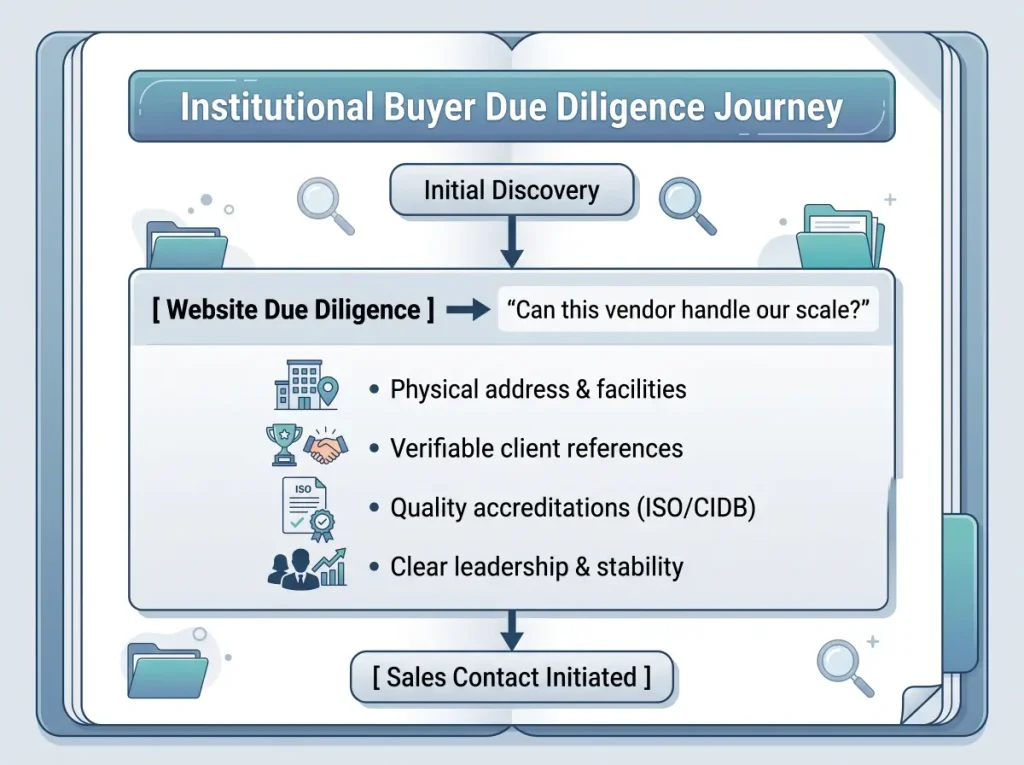
In B2B transactions with substantial contract values, buyers are risk-averse. They use your corporate website to perform due diligence before they ever reach out to your sales team.
Trust & Credibility Checklist
- ☐ Legal Business Information: Prominently display registered company names, registration numbers (SSM details in Malaysia), and official operating addresses.
- ☐ Physical Footprint Evidence: Feature authentic photography of actual corporate facilities, operational plants, warehouses, and teams instead of generic stock photography.
- ☐ Accreditations & Certifications: Display verifiable credentials for quality management (e.g., ISO 9001, ISO 27001), regulatory approvals, safety standards, and industry memberships.
- ☐ Client Portfolio & Case Studies: Highlight enterprise clients (with appropriate permissions) alongside outcome-driven case studies outlining problem, solution, and measurable results.
- ☐ Executive Visibility: Clear biographies and professional portraits of board members and executive management provide institutional reassurance.
- ☐ Legal Governance: Ensure prominent placement of privacy policies compliant with the Personal Data Protection Act (PDPA), terms of use, and whistleblower or anti-bribery statements where appropriate.
12. Review Conversion and Enquiry Paths
Many corporate websites fail to generate qualified leads simply because their inquiry channels are confusing, broken, or unmonitored.
Streamlining the B2B Conversion Funnel
- ☐ Unambiguous Primary Actions: Conclude every core page with a logical next step (e.g., “Request a Capabilities Presentation”, “Speak with an Engineer”, or “Submit an RFQ”).
- ☐ Differentiated Routing: Avoid sending media inquiries, job applications, and high-value procurement requests to a single, unmonitored
info@mailbox. Use clear routing options. - ☐ Balanced Form Fields: Ask enough qualifying questions (e.g., company name, business email, project timeline) to filter spam without creating friction that discourages genuine prospects.
- ☐ Direct Communication Alternatives: Provide verified corporate phone lines, official department emails, and business WhatsApp options where customary in Southeast Asian B2B markets.
- ☐ Automated Confirmations & Tracking: Redirect submissions to a dedicated “Thank You” page confirming receipt, stating expected turnaround times, and triggering analytics conversion events.
13. Review Integrations Before Migration
Enterprise websites rarely exist in isolation. Documenting all external endpoints early prevents last-minute launch delays and data disruptions.
Priority System Endpoints
- CRM & Marketing Automation: Lead connections into platforms like Salesforce, HubSpot, Zoho, or marketing email systems.
- Applicant Tracking Systems (ATS): Careers integrations with Jobstreet, Greenhouse, Workable, or internal corporate HR portals.
- Investor Relations Data Feeds: Real-time stock feeds, financial reporting widgets, or automated exchange regulatory announcement connections.
- Analytics & Tag Infrastructure: Implementations across Google Tag Manager, analytics frameworks, and conversion tracking pixels.
- Customer Communication APIs: Live chat solutions, support ticketing platforms (Zendesk, Freshdesk), or WhatsApp Business API endpoints.
14. Review Security, Backup, and Recovery Requirements
A corporate redesign project must adhere to responsible baseline security practices to safeguard organizational assets, customer data, and operational continuity.
Core Security & Continuity Priorities
- ☐ Secure Protocol Implementation: Use current supported TLS configurations and enforce secure HTTPS redirection across all root domains and subdomains.
- ☐ Hosting Architecture Alignment: Use hosting architecture appropriate to the organisation’s traffic volume, risk profile, and continuity requirements.
- ☐ Administrative Access Controls: Implement role-based access control (RBAC), promptly revoke permissions for departed personnel, and enable MFA for privileged administrative accounts where supported.
- ☐ Automated Backup Strategy: Maintain automated daily or weekly off-site backups stored securely on infrastructure independent of the primary web server.
- ☐ Restoration Verification: Conduct periodic staging restoration tests to confirm that backups can be redeployed within an agreed recovery timeframe.
- ☐ Spam & Abuse Filtering: Implement invisible spam protection (such as Cloudflare Turnstile) on public inquiry forms to keep lead pipelines clean.
15. Prepare a Content Migration Plan
Content bottlenecks delay more corporate website revamps than any other factor. Estimating the time required to draft, review, and approve enterprise copy is critical.
Content Workflow Checklist
- ☐ Copywriting Ownership: Designate who is responsible for drafting copy—internal teams, specialist technical writers, or an external agency.
- ☐ Asset Preparation: Consolidate high-resolution vector logos, approved brand palettes, typography, and original photography into a central repository.
- ☐ Document Rationalization: Review existing downloadable brochures, white papers, and data sheets; archive outdated materials before launch.
- ☐ Multilingual Coordination: If the site requires multiple languages (e.g., English, Bahasa Malaysia, Simplified Chinese), run professional translation workflows alongside English draft approvals rather than treating them as an afterthought.
- ☐ Approval Milestones: Establish fixed sign-off dates for division heads to review technical copy before staging deployment begins.
16. Define Website Performance Requirements
Website performance directly affects user experience, brand perception, and search engine visibility. Slow loading speeds degrade commercial conversion rates.
Performance Benchmarks
- ☐ Responsive Design Across Viewports: Layouts, typography, and complex data tables must adapt smoothly across smartphones, tablets, laptops, and wide monitors.
- ☐ Core Web Vitals Adherence: Optimize Largest Contentful Paint (LCP), Interaction to Next Paint (INP), and Cumulative Layout Shift (CLS) to meet search engine benchmarks.
- ☐ Modern Asset Formats: Serve images in WebP or AVIF formats with responsive dimension tags to reduce page payload.
- ☐ Global Content Delivery (CDN): Route static assets through an enterprise CDN (such as Cloudflare) to ensure fast delivery for local Malaysian users and international stakeholders.
17. Define the Website Handover Requirements
Prevent vendor lock-in by defining the exact deliverables, administrative credentials, and asset rights required at project completion before signing contracts.
Handover Deliverables Checklist
- ☐ Full Administrative Control: Complete super-administrator credentials for the CMS, hosting environment, DNS, and database management.
- ☐ Documented Asset & Software Rights: Clearly document ownership and licensing rights for custom code, design assets, third-party components, fonts, plugins, themes, and licensed software.
- ☐ Design Source Assets: Transfer of interface design files (Figma or Adobe XD) containing full component libraries and visual guidelines.
- ☐ System Architecture Documentation: Clear documentation outlining database schemas, API connections, custom configurations, and third-party dependencies.
- ☐ Internal Staff Training: Practical training sessions and documentation demonstrating how internal teams can update content, manage pages, and review inquiries safely.
18. Define Post-Launch Maintenance Before Launch
A corporate website is an active operational asset that requires continuous maintenance, monitoring, and updates to remain secure and performant.
Establishing Maintenance Responsibilities
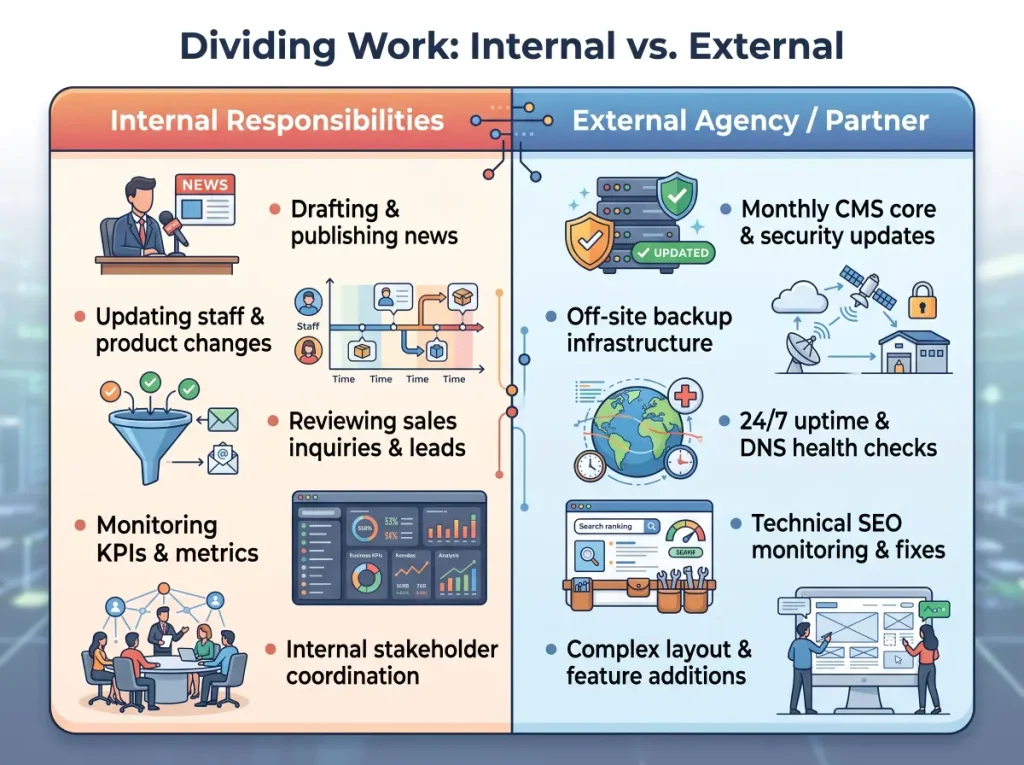
- ☐ Uptime & Health Monitoring: Automated 24/7 alerts notifying technical teams immediately if servers or services experience downtime.
- ☐ Scheduled Software Patching: Monthly schedules for testing and applying updates across CMS cores, modules, and themes.
- ☐ Form & Lead Auditing: Periodic testing of lead capture forms and email routing to confirm inquiries are reaching sales teams without failure.
- ☐ Continuous SEO & Performance Iteration: Regular audits of search rankings, search console errors, and page speed metrics.
Key Rule: Website launch is the beginning of operational ownership, not the finish line of the project.
19. Prepare the Budget and Timeline Realistically
Failed corporate website projects usually stem from unmanaged scope creep or unrealistic timelines that disregard internal review cycles.
Comprehensive Budget Allocation
A realistic corporate website budget accounts for several disciplines:
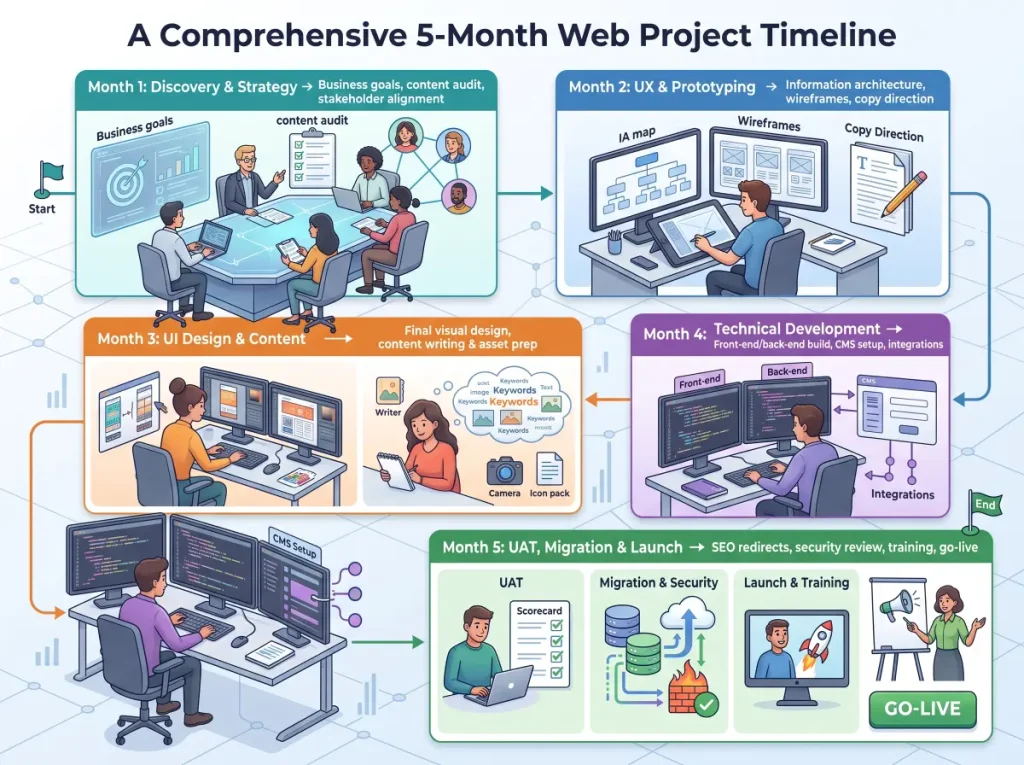
- Strategic Discovery & Architecture: Stakeholder interviews, competitor auditing, user flow mapping, and sitemap design.
- UX & UI Design: Wireframes, interface component design, and responsive design systems.
- Engineering & CMS Implementation: Clean front-end development, robust back-end setup, and CRM/API integrations.
- Content Production: Professional copywriting, brand photography, technical writing, and multilingual translations.
- Technical SEO & Migration: URL mapping, redirect execution, structured data markup, and pre/post-launch benchmarking.
- Infrastructure & Ongoing Licences: Enterprise hosting, CDN, domain renewals, premium plugins, and security tools.
- Post-Launch Maintenance SLA: Structured monthly patching, backup validation, and technical support.
Understanding the Project Timeline
Many corporate website redesign projects may take around 12 to 24 weeks, depending on content readiness, stakeholder approvals, integrations, migration complexity, and project scope.
20. Evaluate the Website Agency Beyond Portfolio Design
Judging an agency solely by polished visual mockups carries significant operational risk. An enterprise website partner must demonstrate strategic, technical, and governance competence.
Strategic Questions to Ask Prospective Agencies
- ☐ Do you understand B2B buying cycles? Can the agency articulate how procurement teams, investors, and corporate buyers evaluate suppliers?
- ☐ How do you execute SEO migration? Does the agency manage the full 1-to-1 redirect mapping and URL protection process, or is technical SEO left to your team?
- ☐ How do you interface with internal IT? Can their technical team engage productively with your infrastructure, security, and database teams?
- ☐ What are your handover terms? Are all source assets, custom code, and software licenses clearly documented and transitioned to your company?
- ☐ What support exists post-launch? Does the agency provide formal Service Level Agreements (SLAs) for security maintenance, or is support concluded at deployment?
- ☐ How is project governance managed? How are change requests, scope adjustments, and milestone approvals documented?
Corporate Website Redesign Readiness Checklist
Use this high-level diagnostic table in your internal meetings to evaluate project readiness before issuing an RFP or kicking off development:
| Project Dimension | Strategic Review Question | Readiness Status |
|---|---|---|
| 1. Business Goals | Have we agreed on the specific commercial problems this redesign will solve? | ☐ Ready |
| 2. Target Outcomes | Are concrete business outcomes and success metrics clearly defined? | ☐ Ready |
| 3. Project Ownership | Is a single internal project owner appointed with clear approval authority? | ☐ Ready |
| 4. Asset Audit | Have we audited existing high-performing pages, backlinks, and content? | ☐ Ready |
| 5. Content Strategy | Are our corporate narrative, service offerings, and proof points validated? | ☐ Ready |
| 6. Access & Ownership | Are domain, DNS, CMS, and analytics administrative accesses verified? | ☐ Ready |
| 7. Technology Choice | Have we determined whether the site requires a visual redesign or a full rebuild? | ☐ Ready |
| 8. SEO Migration | Is an exhaustive URL audit and 1-to-1 301 redirect map planned? | ☐ Ready |
| 9. Search & AI Clarity | Are company data, services, and specifications structured in clean HTML? | ☐ Ready |
| 10. UX Architecture | Can all primary target audiences find what they need within three clicks? | ☐ Ready |
| 11. Corporate Trust | Are legal registrations, physical facilities, and certifications showcased? | ☐ Ready |
| 12. Enquiry Funnels | Are lead qualification fields, routing paths, and SLAs established? | ☐ Ready |
| 13. System Endpoints | Are all CRM, HR, marketing, and investor relations integrations documented? | ☐ Ready |
| 14. Security & Backups | Are baseline protocols, access controls, and backup verification planned? | ☐ Ready |
| 15. Content Production | Are copywriting, photography, and multilingual translation owners assigned? | ☐ Ready |
| 16. Performance | Are Core Web Vitals, mobile usability, and CDN caching targets agreed upon? | ☐ Ready |
| 17. Asset Handover | Are complete source files, root access, and documentation explicitly required? | ☐ Ready |
| 18. Maintenance Plan | Is ongoing ownership for patching, backups, and monitoring settled? | ☐ Ready |
| 19. Budget & Scope | Are contingency buffers for content delays and integrations included? | ☐ Ready |
| 20. Partner Selection | Have we evaluated agencies on technical rigor, SEO capability, and governance? | ☐ Ready |
Frequently Asked Questions
What should a company prepare before redesigning its website?
Before engaging an external web agency, prepare:
- An internal review of what is currently working and what is broken on your site.
- A clear explanation of your business goals and key target audiences.
- An inventory of your domain, DNS, and hosting administrative credentials.
- An export of your top organic landing pages from Google Search Console.
- A designated internal project owner with the authority to manage reviews and consolidate team feedback.
How long does a corporate website redesign take?
Many corporate website redesign projects may take around 12 to 24 weeks, depending on content readiness, stakeholder approvals, integrations, migration complexity, and project scope. Simple sites with prepared content may finish faster, while complex enterprise builds involving multiple stakeholder divisions, multilingual assets, or bespoke ERP/CRM integrations may require more time.
Should we keep our existing website URLs during a redesign?
Whenever possible, yes. Retaining proven, high-performing URLs protects your historical organic search equity and preserves inbound backlinks from external websites. If you must change URLs to improve site structure, you must implement 1-to-1 permanent 301 server redirects from every old URL to its corresponding new page to preserve search rankings and avoid broken links.
Can a website redesign harm our organic search rankings?
Yes. If an agency redesigns a website without a technical SEO migration plan, search engines may encounter broken links, missing metadata, removed content, and unmapped URLs. This often leads to sharp declines in keyword rankings and qualified organic traffic. Following a structured SEO migration protocol prevents these issues and protects your search footprint.
Should IT or Marketing lead a corporate website redesign?
In most successful corporate projects, Marketing or Corporate Communications serves as the primary project champion—focusing on positioning, content, user experience, and conversion funnels—while IT acts as the core technical partner—guiding hosting, cybersecurity, infrastructure, and system integrations. Both departments should be represented on the project committee from day one.
How do we know if we need a visual redesign or a complete technical rebuild?
You only need a visual redesign if your underlying CMS platform is modern, actively supported, fast, and easy for your team to update. You require a complete architectural rebuild if your current website is built on an end-of-life CMS, relies on undocumented legacy code, has accumulated critical security risks, or cannot scale to support your planned business integrations.
What should we ask a web design agency before hiring them?
Ask specific questions about their strategic and technical capabilities:
- How will you protect our existing Google search rankings during the migration?
- What is your process for collaborating with our internal IT and security personnel?
- Are ownership and licensing rights for all code, assets, and design files clearly documented?
- What does your post-launch technical support and maintenance SLA cover?
- Can you share examples of complex B2B projects you have delivered that required structured corporate governance?
What happens if our current website vendor is unresponsive or no longer supporting us?
If your current vendor relationship has stalled, perform a rapid access audit. Prioritize securing or recovering access to your domain name registrar and DNS management platform first. With DNS control, an experienced technical agency can clone or rebuild your digital presence in an independent hosting environment, allowing you to transition smoothly without risking email or website downtime.
Final Thoughts: A Corporate Website Redesign Is a Strategic Business Investment
A corporate website redesign should never be treated as merely a visual update. The most successful revamps are planned long before the first wireframe or design mockup is created.
When commercial objectives, internal ownership, corporate messaging, technical infrastructure, search engine migration, and long-term maintenance are carefully evaluated up front, the redesign process runs faster, avoids unexpected costs, and delivers a reliable, high-performing digital platform for your business.